.png)
Summary. Managing payroll across disconnected spreadsheets and systems quickly leads to errors, compliance issues, and frustrated employees. Payroll system integration connects your payroll software with HR, accounting, and time-tracking tools to automate calculations, keep data consistent, and save time. A successful payroll system setup starts with cleaning and validating employee data, configuring pay and leave rules, defining clear employee classifications, and creating a project timeline with milestones. Companies can choose between one-way or two-way integrations to match their workflows. Common challenges like data mismatches, poor configuration, and compliance gaps can derail the process, but Omni’s automated reminders, real-time syncing, and award-winning support help you avoid costly mistakes. With regular audits, compliance updates, and ongoing training, an integrated payroll system empowers your team to maintain accuracy and efficiency as your business scales.
You’ve just hired 10 new employees. That’s a win. But now your team’s juggling multiple salaries, bonuses, tax setups, and time-off policies across spreadsheets and disconnected tools.
Sound familiar?
It might start out feeling manageable, just a few extra steps here and there. But as more people join the team, those small steps add up fast. Before long, one tiny mistake can throw everything off, from delayed salaries to compliance slip-ups to a team that’s rightfully frustrated.
That’s why payroll system integration matters. When your payroll system is properly connected to HR, performance, and time-tracking tools, things just work. Hundreds of companies solve this problem with Omni, an all-in-one payroll system built to integrate seamlessly with your existing HR tech stack and automate compliance. In this article, we break down your need for payroll integration and a payroll system setup, guiding you through the necessities.
Why Payroll System Integration Matters
Payroll doesn’t always get easier with growth, especially if there’s no right system in place; it gets messier. Each new hire adds more variables to the payroll process: unique pay structures, tax categories, deductions, benefits, time-off policies, and statutory requirements.
Here’s where the cracks usually show:
- Manual work adds up fast when HR, time tracking, and payroll all live in separate systems. Your monthly payroll begins to feel like a puzzle the team has to solve from scratch.
- Errors get expensive. An outdated job title or a missed tax update can lead to overpayments or missed compliance deadlines.
- When all these keep happening, your team starts to burn out. Instead of focusing on meaningful work, they’re stuck fixing errors, chasing down numbers, and running payroll twice just to be sure it’s right.
Many companies see measurable results quickly when they integrate their payroll systems:
“Payroll calculations that used to take three to five working days can now be done in half the time with Omni.”
— Tengku Mohaizad, Group Head of HR Asia, Inspire Brands Asia
Read more about Inspire Brands Asia.

Your integrated payroll system setup is there to fix these issues at the root. It automatically syncs your data across recruitment, attendance, and time-off systems so you’re not stuck entering the same data twice and you can reduce administrative burden and improve accuracy.
Understanding Payroll System Integration
Payroll system integration simply means connecting your payroll software with the other systems your company already uses—like your HRIS, accounting tools, time-tracking apps, or employee benefits platforms—so data flows automatically between them.
The main purpose of having a payroll system integration is to break down the numbers of manual work involved in payroll, causing it to reduce to a bare minimum. This is achieved by turning the payroll procedure itself into an automated one.
With Omni payroll, all your employee data, pay rates, tax information, and time-off balances are synchronized in real time across your HR and finance systems. This means updates in your platform are instantly reflected in payroll calculations, without the need for manual entry or cross-checking spreadsheets.
Try out our payroll interactive demo.
What are the types of integrations
How your payroll system connects with the rest of your tech stack shapes how smoothly your entire process runs. The type of integration you choose directly impacts how fast, accurate, and automated your payroll process becomes.
180° Integration (One-way sync):
In this type, data flows in a single direction, typically from your HR system to payroll. For example, employee data, pay rates, or time-off balances are pushed into payroll, but updates made in payroll don’t flow back to HR. It’s simple and useful for companies where payroll doesn’t need to update upstream systems.
360° Integration (Two-way sync)
Data moves in both directions. Your payroll system not only receives updates from HR or time-tracking tools but can also send data back, like processed payroll data, tax deductions, or updated leave balances. This keeps everything in sync and reduces duplicate entry across teams.
Omni supports both integrations, so you can start with a simpler workflow and scale up to more complex structures as your business grows.
Benefits of integration
You need payroll system integration to give a clear, consolidated view of employee information and payroll data, which makes employee data management more visible and helps to track and reduce labor costs.
Another underrated benefit of integrating your payroll system is fewer communication bottlenecks. When HR, finance, and payroll all pull from the same data, there’s less chasing down documents or double-checking who made what change.
With Omni, these benefits are built in. For example, your HR team can approve time-off requests directly on the platform, and Omni automatically updates leave balances and recalculates payroll, so you’re always working with updated, real-time data.
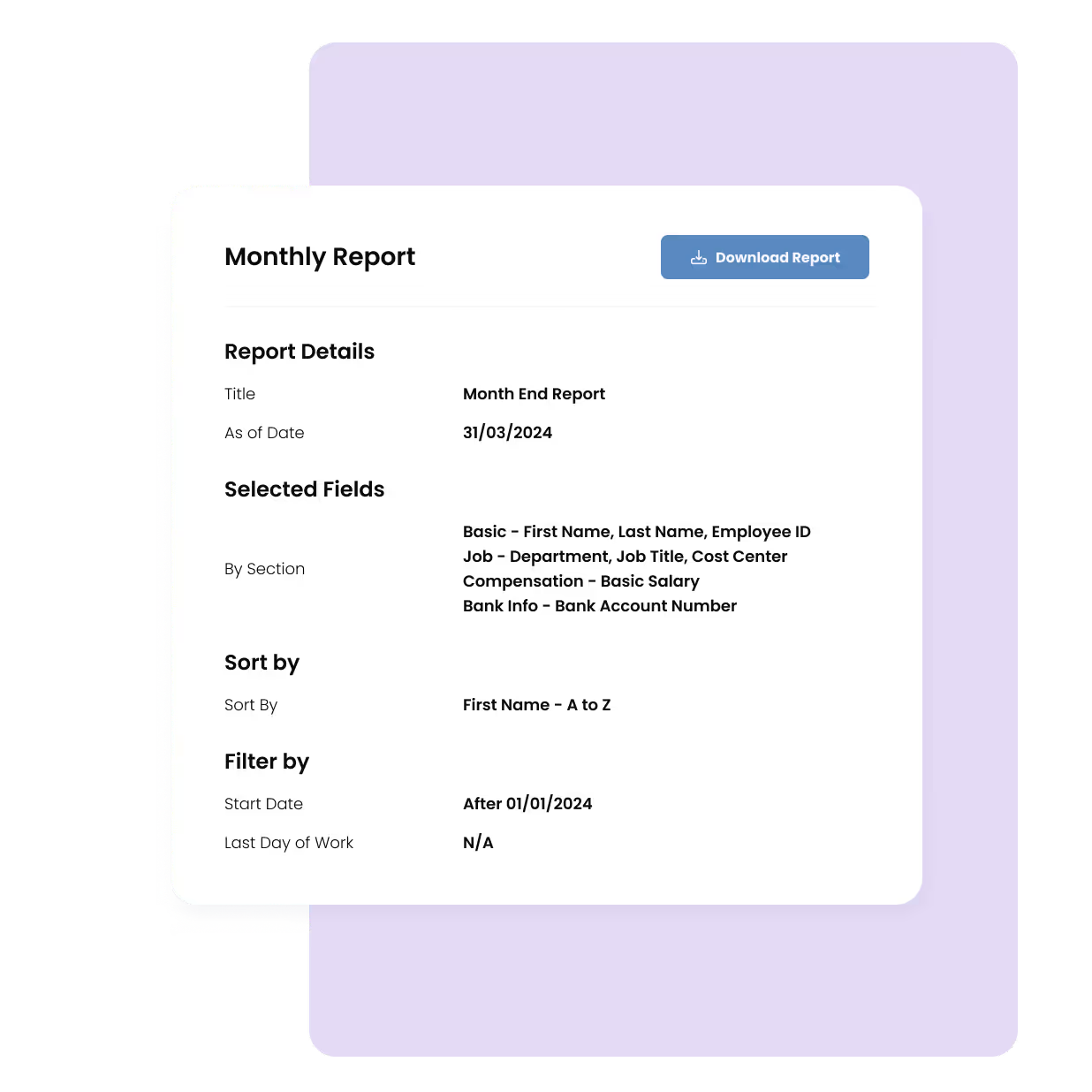
Integration also makes reporting way easier. If you need to pull a quick breakdown of overtime payouts, department-level payroll costs, or year-end tax summaries, with everything connected in Omni, those reports are just a few clicks away.
What to Prepare Before You Start Payroll System Integration
Before you dive into payroll system integration, a little groundwork goes a long way. The smoother your setup, the fewer surprises down the line.
Review your current tools and data sources.
Identify where your employee data lives. Is it within your HRIS, a time-tracking app, or multiple spreadsheets? Document every source so you can map how these data connect to your payroll system.
Clean and validate employee data.
Before your payroll system integration, verify that your data is accurate and complete. Ensure the job titles, tax information, and payment details are up to date. Cleaning the data now means you can prevent costly errors down the road.
Define employee roles and classification.
Establish clear classifications for each of your team members, whether that be full-time, part-time or independent contractors. Classifying them correctly ensures that payroll processes, taxes, benefits, and leave balances are managed accurately.
Create a clear project timeline with milestones
Outline each phase of the payroll system integration with milestones and deadlines. With a structured plan and timeline, you can keep track of progress and give yourself a confidence boost during your rollout.
6 Steps for Payroll System Setup
With all the preparation work done, it’s time for the payroll system setup. However, it doesn’t have to be complicated. Follow these six essential steps to launch with clarity and compliance.
1. Choose a payroll solution that fits your business needs
Start by picking a payroll platform that works for your team. Consider factors like team size, pay structure complexity, compliance requirements, and the systems you’ll integrate with. There’s no one-size-fits-all here; it’s important to choose the option that’s built for how your business runs currently and in the future.
For example, Omni offers multi-country payroll features across APAC, ideal for enterprises with distributed teams.
"What drew us to Omni was the flexibility of the platform in terms of all the fields that we want to incorporate to fit our business needs. Omni can serve all the countries that we have and, in the future, our expansion plans as well."
— Lovely Tan, Philippines Country Head of People, Qashier
Learn how: Qashier Slashed Payroll Processing Time by 75% with Omni
Picking the right payroll system integration can save you time and reduce risk as you scale.
2. Configure payroll settings
Once your system is in place, it’s time to set up your core payroll configurations, such as adding in salary structures, tax rules, payment schedules, and other settings depending on company policies. A precise configuration lays the foundation for reliable and compliant payouts.
3. Map and validate employee data
Enter employee details carefully: names, job titles, salary details, tax status, and bank information. Consistency is important here, as a single mismatch can lead to payroll errors and rework down the line. To streamline this process and ensure accurate payroll documentation, using a free editable printable pay stub from tools like Real Check Stubs can help you generate professional pay stubs efficiently, reducing errors and saving time.
4. Integrate supporting systems
Connect your HRIS, time tracking, and expense platforms so your payroll system can pull accurate data automatically. Payroll system integration workflows help reduce manual updates and catch discrepancies early before they become real issues.
5. Run parallel payroll for testing
Before going live, run a parallel payroll test with real data. This step helps you confirm calculations are accurate, uncover any gaps, and ensure your setup works as planned.
6. Finalize approvals and go live
After thorough testing, secure necessary internal approvals from leadership and switch to your new system. Set up a maintenance schedule for regular checks and updates so your payroll system integration runs smoothly month after month.
Common Payroll System Integration Challenges & How to Avoid Them
Even the best payroll system setups can fall short if the integration is not carefully planned and executed. Here are some of the most common payroll system integration challenges and ways to prevent them:
Data mismatch
If your employee records aren’t accurate or aligned across systems, integration will only magnify the problem. A wrong job title, missing tax ID, or outdated pay rate can throw off the entire payroll run and erode trust with your team.
How to avoid it: Validate all employee data up front, including job titles, tax information, and pay details, and put controls in place to keep records current.
Poor configuration of leave and payroll rules
If leave balances, overtime rules, and pay structures do not align with company policies, you risk underpayments, overpayments, and frustrated employees.
How to avoid it: Configure rules during the payroll system setup and review them regularly to reflect any policy changes.
Limited support during payroll system setup
Rolling out your payroll system without enough hands on deck can slow everything down. Without proper training or implementation help, mistakes are more likely and harder to catch.
How to avoid it: Partner with experts who specialize in seamless payroll system setup and rollouts.

Omni’s award-winning support team provides dedicated implementation assistance, from initial configuration to testing and admin testing. With hands-on guidance at every step, you can launch confidently and keep your payroll running smoothly.
Compliance gaps in local tax or statutory filing
Every country (and sometimes state) has its own tax laws and reporting requirements. If your payroll system isn’t aligned with these, then the payroll system setup risks penalties or missed filings.
How to avoid it: Schedule regular compliance reviews and ensure your system stays updated for all relevant regulations.
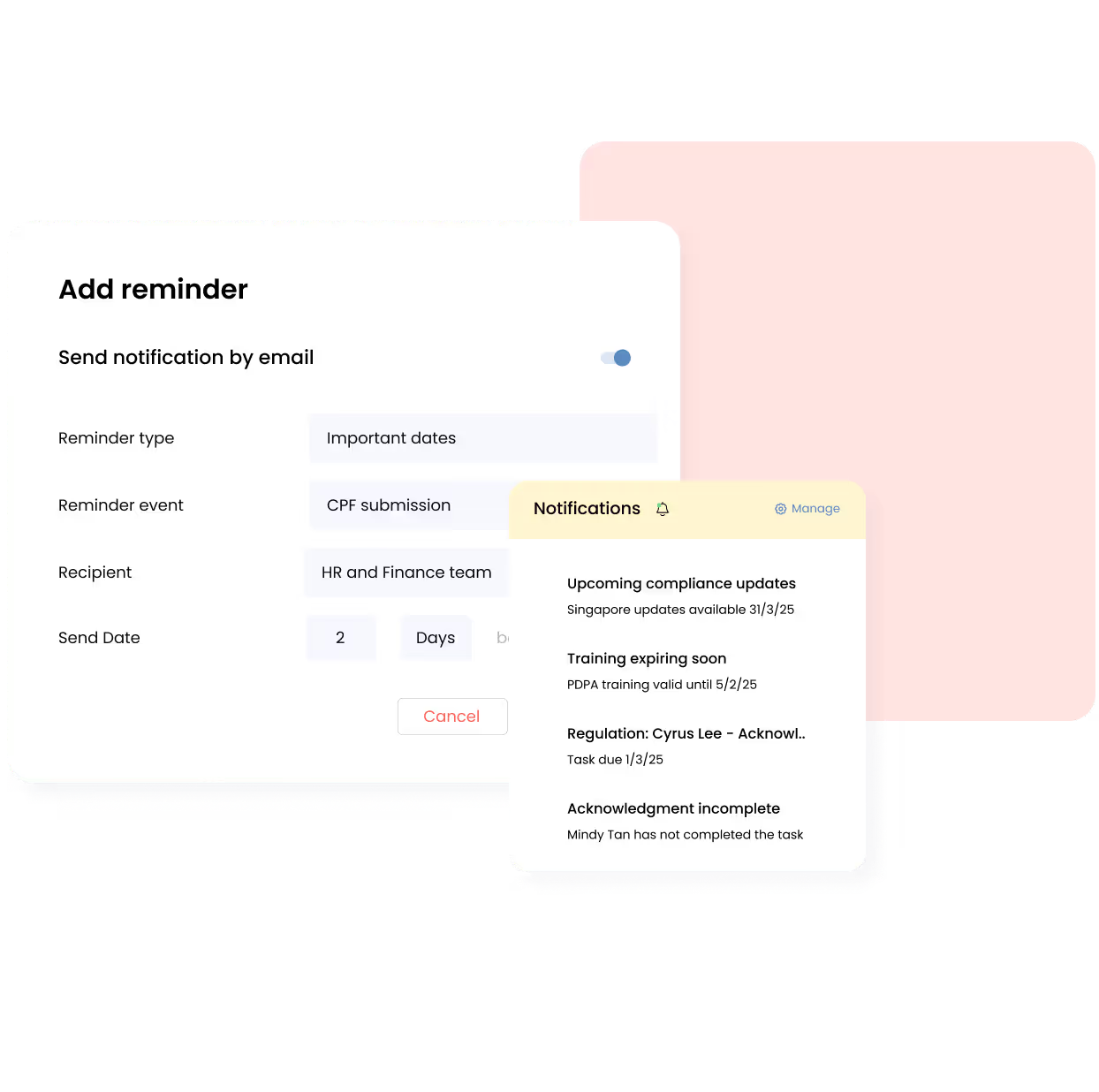
Omni simplifies this with automated reminders and notifications that alert you when filings like CPF contributions or tax updates are due, so you never miss a critical deadline.
Best Practices for Payroll System Integration Maintenance
- Audit trails, regular data syncs: What we said about regular auditing still stands; consistent audit logs and regular data synchronizations help ensure your payroll system integration performs properly. This reduces errors, ensures accurate reporting, and protects against data loss.
- Schedule compliance updates: Set up a calendar to track payroll compliance updates. Staying proactive helps you avoid surprises and maintain complete visibility across your payroll and employee data management systems.
- Train admins on how to manage payroll updates: Another best practice of maintaining payroll system integration is to provide ongoing training for payroll staff and administrators. When your team knows how to efficiently manage updates and ensure data security, you gain confidence in every payroll cycle.
Confidently Go Live With Omni’s Seamless Payroll System
As we’ve highlighted, payroll software integration offers a range of benefits, from streamlining payroll processes to ensuring compliance with changing regulations. By connecting your payroll with your existing HR and accounting systems, you’re not only saving time but also gaining greater accuracy, transparency, and control over your payroll management.
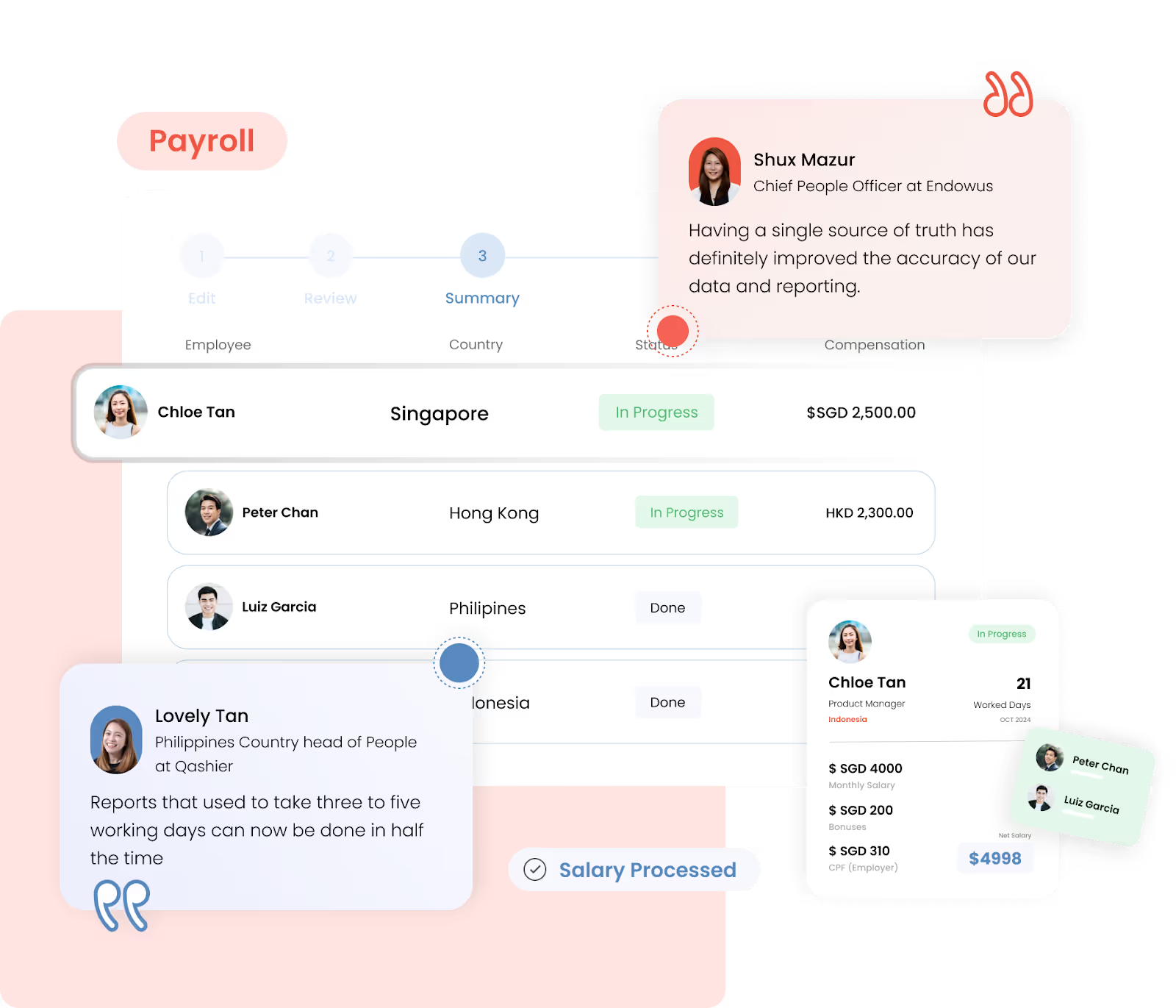
With Omni, you get a comprehensive integration solution built for growing enterprises across APAC. Trusted by many leading businesses, Omni helps to:
- Consolidate end-to-end payroll processing, reducing errors and freeing up valuable time for strategic initiatives.
- Ensure compliance with regulatory requirements such as mandatory contributions, tax submissions, and statutory reporting.
- Give your team instant access to payroll essentials like payslips and tax documents through employee self-service portals.
- Track payroll costs, pay equity, and compensation trends to make informed decisions.
- Seamlessly integrates with accounting software and time-tracking tools for smooth data flow.
Make the switch to Omni today and discover how it can help you simplify payroll system integration, reduce payroll costs, and ensure compliance. Book a demo with our team today to learn more.


.png)
.png)