.png)
Summary. MCP (Model Context Protocol) is the open standard that lets AI assistants like Claude, ChatGPT and Cursor read and act on live business data. For HR teams planning 2027, the question has moved from "should we connect AI to our HR system?" to "how do we do it without losing control of who sees what?" Omni HR's native MCP integration connects those assistants to live HR data. Every answer and action is scoped to the permissions each user already has.
There’s a new regulation that just passed and your HR policies need to be updated. Chances are, your employees are already using AI assistants to get clarification on these updates. The problem here is that those assistants can’t see your HR system, leading to exported reports, updated employee data, and actions on answers that can’t be verified. How your platform implements it decides whether that becomes a compliance risk or a reliable part of how HR runs in 2027.
What is MCP for HR?
MCP for HR means connecting AI assistants to your HR platform through the Model Context Protocol, an open standard for linking AI to business software.
Once connected, HR teams, managers and employees can ask questions or take approved actions in plain language, and the AI responds using live HR data rather than exported files.
The setup has two sides. Your HR vendor provides an MCP server, which defines what data the AI can read and which actions it can take. Your AI assistant connects to that server when you sign in with your normal HR account.
Since MCP is a shared standard, one HR MCP server works across Claude, ChatGPT, Cursor and other assistants that your team uses on a regular basis.
MCP vs API: What’s the Difference for HR Teams?
MCP usually runs on top of a vendor's API. The difference is that an HR manager can use it without an engineer.
MCP Use Cases for HR Teams
The best MCP use cases in HR are for dealing with repetitive, admin heavy tasks. These may be questions that managers or employees are asking on a weekly basis such as:
For HR teams: fewer ad hoc report requests
Much of HR's week goes to one-off data requests from managers and leadership: headcount by team, who's joining, who's out. With MCP, the people who ask can pull those answers themselves, scoped to what they're allowed to see.
HR stops being a manual reporting desk, and the numbers come from the live system instead of last month's spreadsheet.
For people managers: answers in the flow of work
Some managers may already be using AI assistants for planning and writing. With MCP for HR, managers can easily check team leave before approving a pending request, or prep for an upcoming one-on-one without switching into the HR system.
Since the MCP is tied to all the access controls within the HR system, the manager will only be able to access what they are already permitted to see.
For employees: self-service that actually gets used
Checking a leave balance, requesting time off or updating personal details are simple tasks that still generate HR tickets.
When employees can handle them from the AI assistant they already use, adoption of self-service goes up and routine queries to HR go down.
For multi-country teams: one answer across markets
For companies operating across Singapore, Malaysia, the Philippines, and more, HR data often sits in different systems per country.
MCP is only as reliable as the data behind it. Connected to a single, unified HR platform, it can answer cross-market questions accurately. Connected to three separate tools, it returns three versions of the truth.
What MCP Shouldn’t Do in HR
MCP works best for retrieval and simple, reversible actions. Keep humans firmly in charge of anything involving judgement or significant consequences, such as:
- Performance and disciplinary decisions
- Compensation changes
- Terminations
- Final payroll approval
This isn't only good practice. Human accountability is one of the four pillars of Singapore IMDA's Model AI Governance Framework for Agentic AI, alongside:
- Bounding risks upfront
- Technical controls
- End-user responsibility
Why HR Teams Should Plan For MCP in 2027
AI agents are becoming standard in business software
Gartner projects that 40% of enterprise applications will be integrated with task-specific AI agents by the end of 2026, up from less than 5% in 2025.
By 2027, "does it support MCP?" will be a baseline question in HRIS evaluations.
Risk controls decide which AI projects survive
Gartner also predicts that over 40% of agentic AI projects will be cancelled by the end of 2027 due to escalating costs, unclear business value or inadequate risk controls. HR integrations that inherit existing access controls are the ones that will pass legal and IT review.
Trust depends on data quality
Omni HR's State of AI in HR report found that only 21% of HR leaders across Asia trust AI outputs enough to act on them without manual review. The report traces the gap to fragmented, inconsistent HR data.
Consolidation beats connector sprawl.
A separate MCP connection for each HR, payroll and leave tool multiplies the permission settings to manage and the places data can drift. One unified platform behind one connection is simpler to govern and easier to audit.
How to Evaluate An HR Platform’s MCP Integration
MCP security depends on how the vendor builds the server, not on the protocol alone. IMDA's framework notes that AI agents inherit both traditional software vulnerabilities and AI-specific risks such as data leakage.
The biggest HR-specific risk is unofficial community-built servers. These wrap a vendor's API with a personal key and often lack proper permission controls.
Ask any HR vendor:
- Is the MCP server built and maintained by you, or by a third party?
- Does the AI inherit each user's existing permissions, or use a shared key?
- Is any HR data stored at the connector level?
- Can admins control which roles are allowed to connect AI assistants?
- What happens to a user's AI access when they leave the company?
- Which modules are covered today, and what's on the roadmap?
- Does the data come from one unified system or several?
Omni HR's MCP: A Native Option Built for Multi-Country Teams in Asia
If you're evaluating MCP for HR, Omni HR's native MCP integration is built around the checklist above.
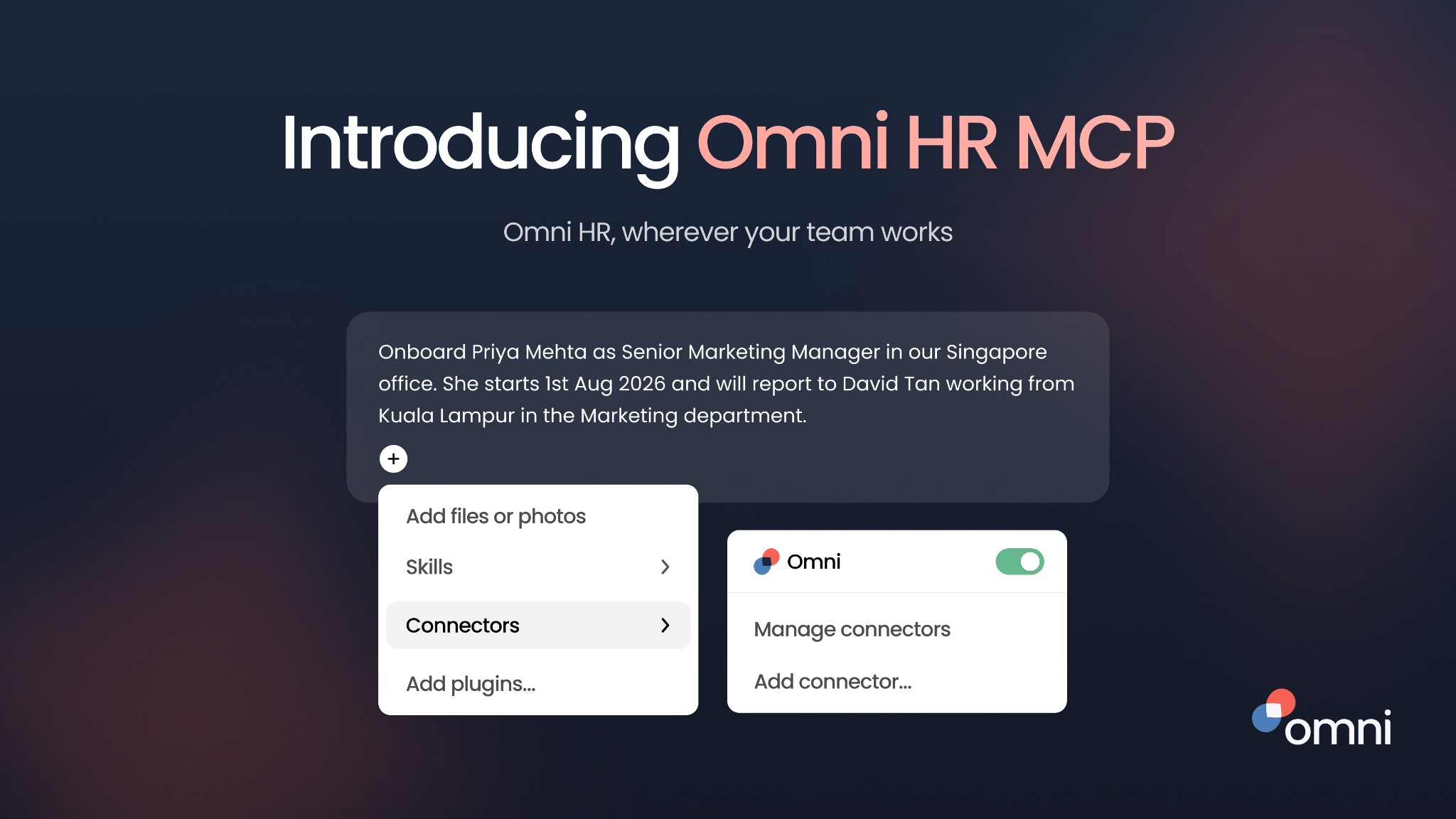
Our integration connects Claude, ChatGPT, Cursor and more, to live HR data in Omni HR. Every action is scoped to what the signed-in user is already authorised to see, and no HR data is stored at the connector level.
What it covers today: employee data, lifecycle management and time off, with more capability added as the toolset expands. In practice, that means asking your AI assistant:
- "Who's on leave this week?"
- "Run a headcount snapshot by department."
- "Update my profile details."
- "Check or request my time off."
How permissions work:
- The AI acts as the signed-in user and can't see or do more than that user already can.
- If something is off-limits, it says so rather than looking for a workaround.
- Admins decide which roles can connect an AI assistant.
- Access ends automatically when an employee leaves or their profile is deleted.
Why it holds up for multi-country teams: Omni HR runs hiring, people operations, performance and payroll in one platform built for Asia. Your AI assistant works from a single, real-time source of truth across markets, not a patchwork of country-level tools.
The MCP integration complements Mino, our AI agent that works directly inside the platform. For a technical deep dive into Mino, read our blog here.
Relevant reading: How HR Teams in Asia Use Mino to Prep for Multi-Country Reviews
Bring Your HR Data Into The AI Tools Your Team Already Uses
In 2027, AI assistants will be part of how HR answers questions and runs everyday processes. The platforms that earn a place in that workflow will give AI a single, permission-controlled source of truth across every market you operate in.
Omni HR's MCP integration brings your HR data into Claude, ChatGPT and Cursor, with your access controls built in from the start. See Omni HR's MCP integration in action today.
Frequently Asked Questions
MCP (Model Context Protocol) in HR is a standard way to connect AI assistants like Claude and ChatGPT to your HR system. Once connected, users can ask questions and take approved actions in plain language, using live HR data within their existing permissions.
The most valuable are high-frequency, low-judgement tasks: checking who's on leave, requesting time off, headcount snapshots, profile updates, new joiner visibility and manager 1:1 prep.
It can be, if the MCP server is vendor-built, inherits each user's permissions, stores no data at the connector level, and gives admins control over access. Avoid community-built servers that use shared API keys.
Yes. ChatGPT, Claude, Cursor, Gemini and Microsoft Copilot all support MCP, so one HR MCP server can work across several assistants.
A growing number of HR platforms now offer vendor-built MCP servers. For multi-country teams in Asia, Omni HR offers a native MCP integration covering employee data, lifecycle management and time off.
Omni HR MCP is Omni HR's native integration connecting AI assistants like Claude, ChatGPT and Cursor to live HR data. Every action is scoped to the signed-in user's permissions, and no HR data is stored at the connector level. It's currently in early access for Omni HR customers.
It depends on the vendor. Omni HR's MCP integration currently covers employee data, lifecycle management and time off. Payroll decisions should stay with humans regardless of vendor.
Not with a vendor-built integration. An admin enables access and users sign in from their AI assistant, with no code required.